LinkedIn outreach automation is the use of software to send connection requests, messages, and follow-ups on LinkedIn without manual effort. It works by running sequences that mimic human activity, such as viewing profiles, sending personalized connection notes, and delivering follow-up messages on a timed schedule. Most tools operate either as browser extensions or cloud-based platforms, with cloud tools generally considered safer. LinkedIn actively restricts accounts that exceed roughly 100 connection requests per week or show bot-like patterns, making safe implementation critical for anyone who depends on LinkedIn for lead generation.
Why LinkedIn Outreach Automation Matters (and Why It Is Risky)
LinkedIn has over 1.2 billion members. For B2B sales, it is the single best platform to reach decision-makers directly. No gatekeeper, no spam folder. Your prospect can see your face, your background, and your content before you ever send a message.
That is exactly why everyone wants to automate it. And the data supports the channel: LinkedIn DMs average roughly 10 percent reply rates compared to about 5 percent for cold email. That two-to-one advantage makes LinkedIn the higher-leverage channel for most B2B outreach.
The problem is straightforward. If you are doing outreach manually, you can realistically send 15 to 20 connection requests per day and still have time to actually run your business. That gets you maybe 80 to 100 new connections per month, assuming a 30 to 40 percent acceptance rate. For most B2B pipelines, that is not enough volume to build consistent deal flow.
Automation solves the volume problem. But it creates a new one: LinkedIn does not want you automating. They have invested heavily in detection systems, and they will restrict or permanently ban accounts that violate their rules. I have seen founders lose 5,000-plus connection networks overnight because they pushed too hard with a browser extension.
This guide covers how to automate LinkedIn outreach in a way that actually works long-term. Not just which buttons to press, but how to stay within the boundaries that keep your account safe.
What Is LinkedIn Outreach Automation?
LinkedIn outreach automation covers a wide range of approaches. At the simplest end, you are using templates and scheduling tools. At the other end, AI agents are finding prospects, writing messages, and managing entire campaigns.
Here is the spectrum:
Manual with templates. You write message templates with placeholder variables (first name, company, role) and manually send each one. No software touches LinkedIn. This is the safest approach, but it does not scale.
Semi-automated tools. Software handles the repetitive actions: sending connection requests, delivering follow-up messages on a schedule, and tracking who replied. You still build the lists and write the messages. Most LinkedIn automation tools fall here.
Fully automated AI platforms. AI agents identify prospects based on buying signals, generate personalized messages, and manage outreach campaigns end to end. This is the newest category, and it changes the fundamental approach from "automate the sending" to "automate the finding."
The approach you choose depends on your volume needs, risk tolerance, and budget. Most businesses end up somewhere in the middle.
Why LinkedIn Cracks Down on Automation
LinkedIn makes money by keeping the platform valuable for its users. If every message in your inbox is an automated pitch, you stop logging in. That is bad for their business.
Here is what LinkedIn actively enforces:
Connection Request Limits
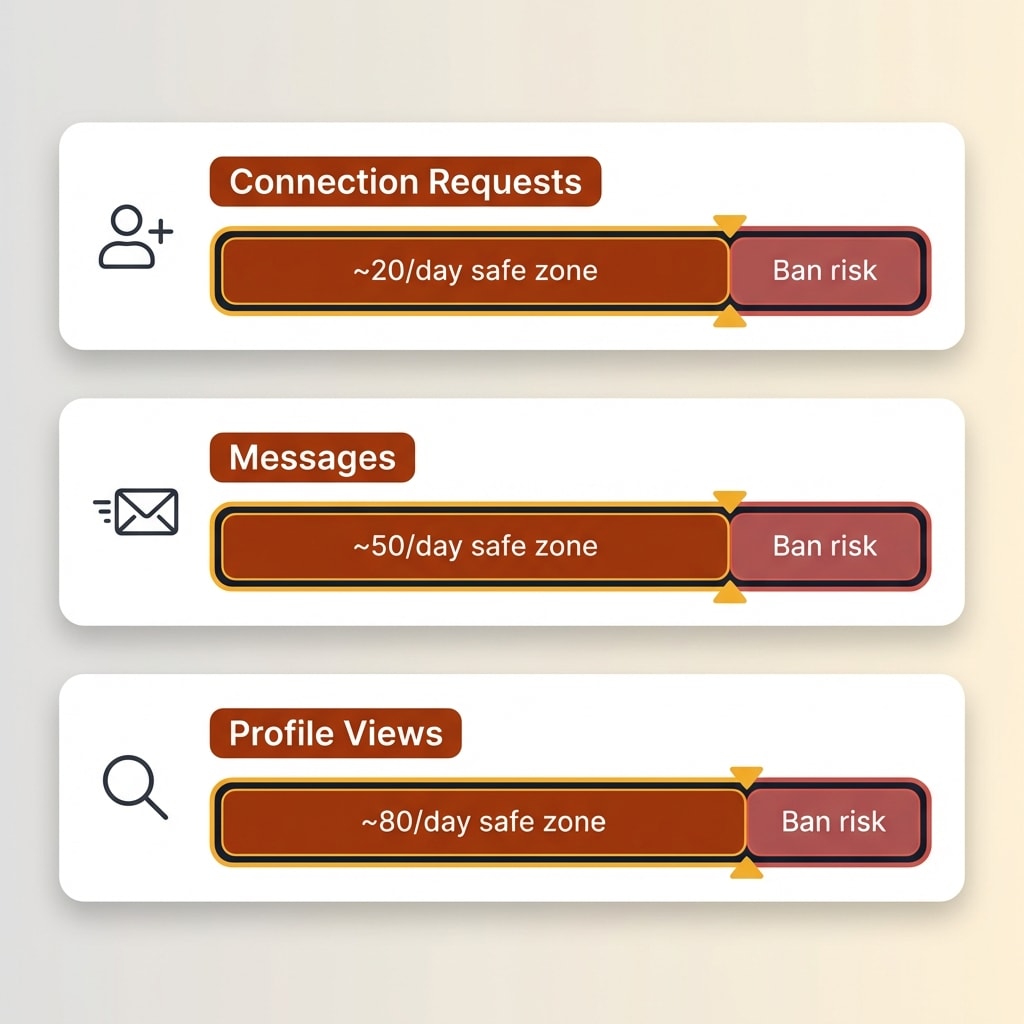
LinkedIn caps connection requests at roughly 100 per week for most accounts. Accounts with a high Social Selling Index (SSI) and consistent organic activity tend to have higher acceptance rates, which means fewer restrictions in practice. But SSI itself does not grant higher quotas. The ceiling is around 200 per week for everyone, including premium accounts.
It is worth noting that LinkedIn has shifted from fixed quotas to dynamic, behavior-based limits in 2025 and 2026. The platform now evaluates patterns holistically rather than enforcing simple numerical caps. This means even moderate volumes can trigger flags if the activity looks robotic.
Exceed sustainable limits and LinkedIn will temporarily lock you out of sending invitations, usually for a week. The enforcement escalation is predictable: temporary restriction first, then weeks-long blocks, then identity verification requests, and finally permanent bans. Repeat offenders rarely get a second chance.
The Commercial Use Limit
LinkedIn has a lesser-known restriction called the Commercial Use Limit. It caps how many people searches you can run on a free or Premium Career account to roughly 300 per month (about 10 per day), resetting on the first of each month. When you hit it, search results get throttled and you cannot view full profiles. Free accounts also cap search results at around 1,000 per query, compared to 2,500 for Sales Navigator.
Sales Navigator bypasses the Commercial Use Limit, which is one reason serious outreach teams use it. But Sales Navigator does not increase your connection request limits.
What Gets You Flagged
LinkedIn's detection systems look for patterns that humans do not produce:
- Sending velocity. Even 10 to 30 connection requests in a short burst looks nothing like a human if the timing is robotic. Spacing actions randomly across a full day is the baseline requirement.
- Low acceptance rates. If you send 100 requests and only 10 get accepted, LinkedIn interprets that as spam. Targeting matters.
- Generic messages at scale. Identical message text sent to dozens of people triggers pattern detection.
- Browser extension fingerprints. LinkedIn can detect known automation extensions running in your browser session. Some extensions inject visible DOM elements that are easy to spot.
- IP anomalies. Logging in from your home IP and suddenly running automation from a data center IP is a red flag.
- Concurrent sessions. Logging in from multiple locations or devices simultaneously is a detection signal. If your automation tool is running while you are also browsing LinkedIn, that pattern looks suspicious.
LinkedIn has also stepped up enforcement against third-party data scrapers. In 2025, platforms including Apollo.io and Seamless.ai faced takedowns for scraping LinkedIn data at scale, reinforcing that LinkedIn treats unauthorized data collection seriously.
Safe Approaches to LinkedIn Automation
Cloud-Based vs Browser-Based Tools
This is the most important decision you will make.
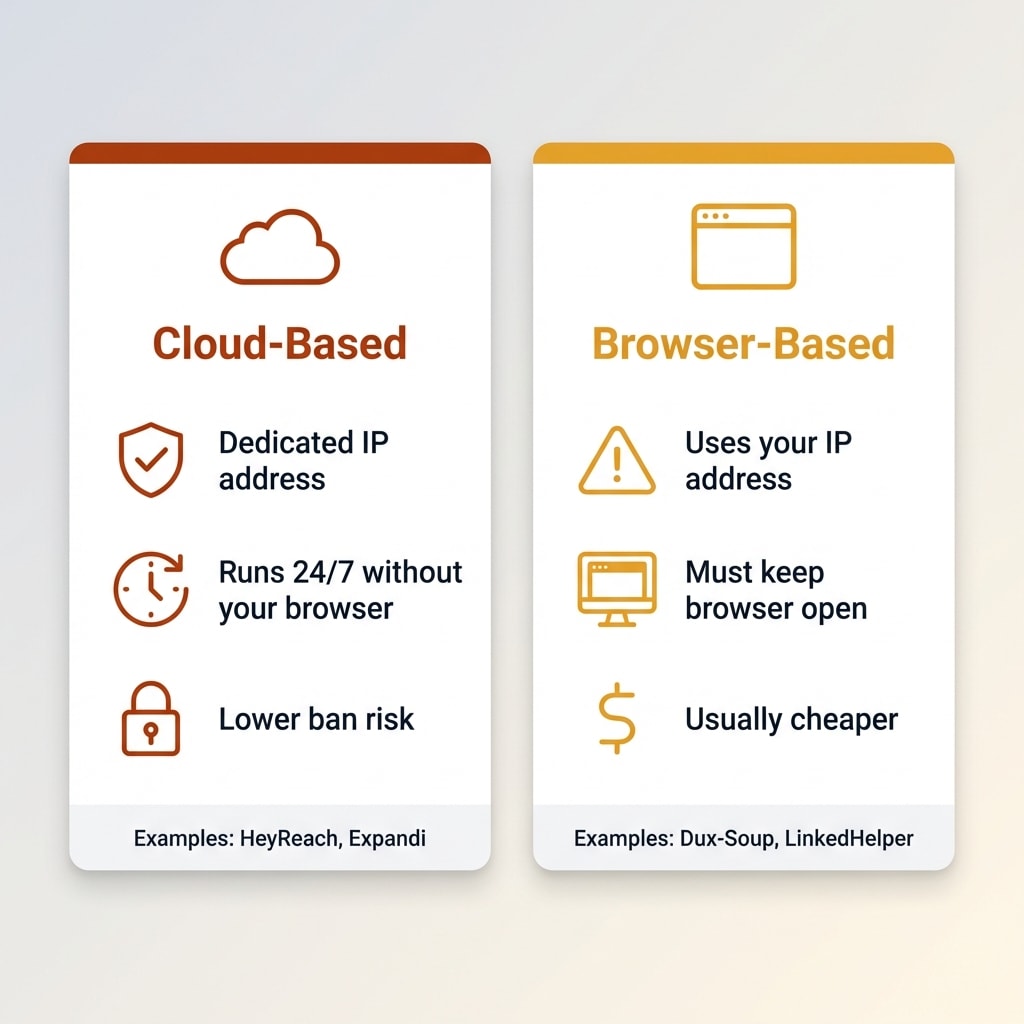
Browser-based tools run as Chrome extensions. They operate inside your actual LinkedIn session, clicking buttons and filling fields the way you would. The advantage is simplicity. The disadvantage is that LinkedIn's front-end code can detect these extensions. Several popular browser tools have had their entire user bases flagged when LinkedIn updated their detection.
Cloud-based tools run on remote servers. They connect to LinkedIn through dedicated IP addresses and operate independently of your browser. Because they do not inject code into LinkedIn's front end, they are harder to detect. The tradeoff is that you are giving a third-party service access to your LinkedIn credentials.
For anyone doing outreach at meaningful volume, cloud-based tools are the safer choice. Most of the tools that agencies and sales teams rely on in 2026 are cloud-based.
Want to Hear From Me Weekly?
I'm putting together a weekly email with the real stuff. What's working, what's not, and the tools I'm actually using to grow. Not live yet, but you can grab a spot. Totally free!
Activity Limits and Warming Up Accounts
Even with a cloud tool, you cannot go from zero to 100 requests on day one. LinkedIn's algorithms track behavioral changes. A sudden spike in activity on a previously quiet account is a clear signal. As a baseline, build your network to at least 300 connections organically before introducing any automation. Accounts below that threshold look new and get scrutinized more heavily.
The standard warm-up approach:
- Week 1: 5 to 10 connection requests per day, 10 to 15 profile views
- Week 2: 10 to 15 requests per day, 20 to 30 profile views
- Week 3: 15 to 20 requests per day, normal messaging volume
- Week 4 onward: Steady state at 20 to 25 requests per day
Combine this with organic activity. Post content, comment on others' posts, endorse skills. LinkedIn rewards active profiles with higher limits and better visibility.
Personalization Requirements
Generic outreach is dead on LinkedIn. Not just because it performs poorly, but because identical messages are a detection vector.
Every message in your sequence should include at least one dynamic variable beyond the first name. Reference the prospect's company, role, recent content, or a mutual connection. The best-performing outreach I have seen uses two to three personalization points per message.
Spintax (message variations) helps too. Instead of one connection note, write five variations and rotate them. This makes your activity pattern look more natural to LinkedIn's systems while also improving response rates.
How to Set Up Automated LinkedIn Outreach
Step 1: Define Your ICP and Build Target Lists
Do not skip this. Every wasted connection request is a message you cannot send to someone who matters.
Define your ideal customer profile based on:
- Industry and company size. Are you selling to SaaS startups with 10 to 50 employees, or enterprise companies?
- Job title and seniority. Who makes the buying decision? VP of Marketing is different from Marketing Coordinator.
- Geography. If you sell to US companies, do not waste requests on connections in markets you do not serve.
Use LinkedIn Sales Navigator if your budget allows it. The advanced filters (company headcount growth, job changes in the last 90 days, technologies used) make your targeting dramatically more precise. If you are on a free account, use LinkedIn's basic people search with industry and title filters, then manually qualify each profile before sending.
Build lists of 200 to 500 prospects at a time. Small enough to stay personal, large enough to generate meaningful data.
Step 2: Write Personalized Message Sequences
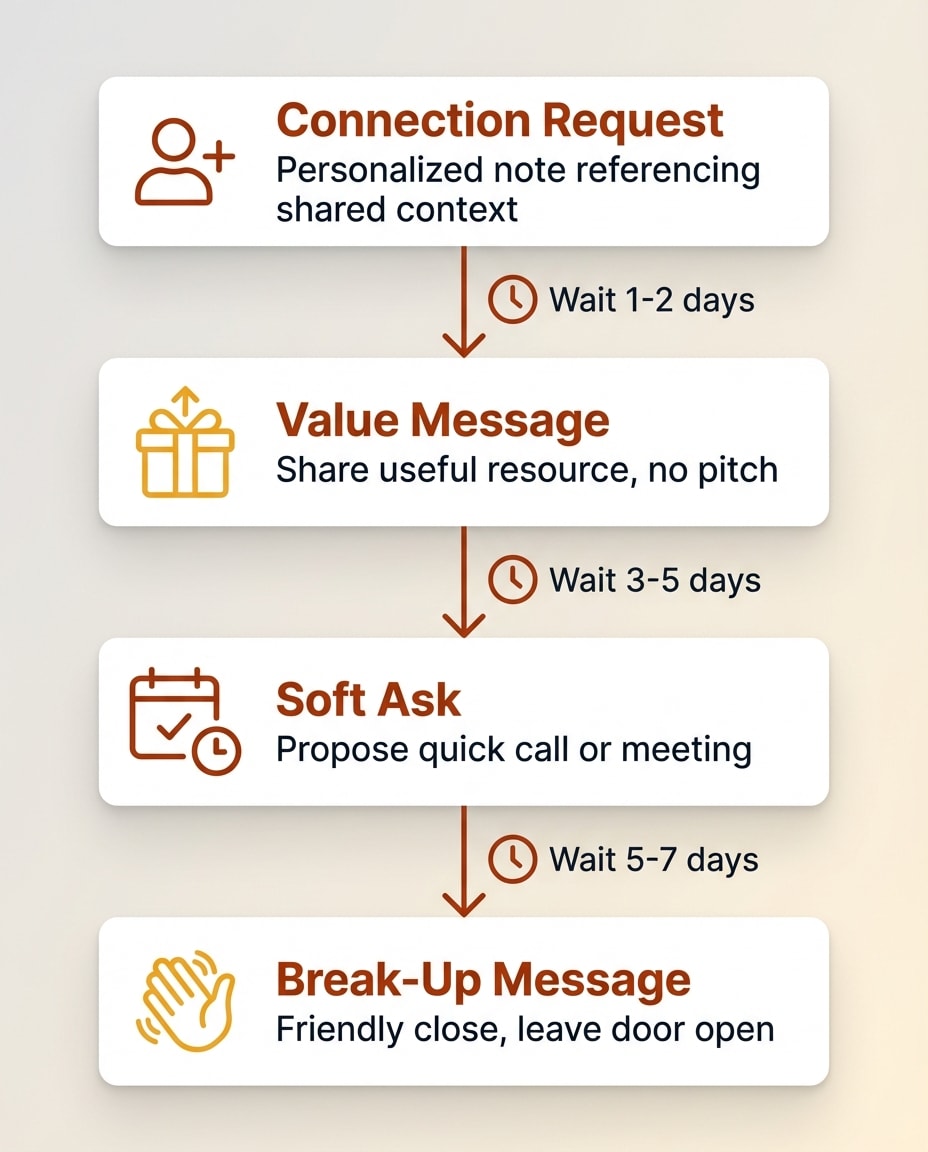
A standard LinkedIn outreach sequence has three to five touches:
Connection request (Day 1): Keep this short. Under 300 characters. Reference something specific. One counterintuitive finding: studies show connection notes barely affect acceptance rates (roughly 26 percent with a note vs 26 percent without). But they dramatically increase reply rates after acceptance. So notes are not about getting accepted — they are about priming the conversation. Keep them short and relevant, not pitchy.
"Hi [First Name], I saw your post about [topic]. We are working on something similar for [industry] companies. Would be great to connect."
First follow-up (Day 2-3 after acceptance): Deliver value. Do not pitch.
"Thanks for connecting, [First Name]. I put together a short breakdown on [relevant topic] that might be useful given what [Company] is doing in [area]. Happy to share if you are interested."
Second follow-up (Day 5-7): Soft ask.
"[First Name], just circling back. We have been helping [similar company type] with [specific outcome]. Would a 15-minute call make sense to see if there is a fit?"
Final touch (Day 10-14): Break-up message.
"[First Name], no worries if the timing is off. If [pain point] ever becomes a priority, feel free to reach out. Always happy to chat."
Write at least three variations of each message. Rotate them to avoid pattern detection.
Step 3: Choose Your Automation Approach
You have three options:
Manual + templates. Use a spreadsheet to track outreach and write messages from templates. Zero risk of bans. Does not scale past 15 to 20 touches per day.
Cloud-based automation tool. Tools in this category handle connection requests, follow-up sequences, and reply detection. Pricing typically ranges from $30 to $100 per month per seat. Look for features like dedicated IP addresses, built-in warm-up, activity randomization, and reply detection that pauses sequences.
AI-powered intent tools. These identify who to reach out to based on buying signals, then handle the outreach. This is a fundamentally different approach, covered in the next section.
Step 4: Set Daily Limits and Monitor Responses
Regardless of what your tool allows, set conservative daily limits:
- Connection requests: 20 to 25 per day maximum
- Messages to first-degree connections: roughly 50 per day on free accounts, up to 250 on Sales Navigator
- Profile views: roughly 500 per day on basic accounts, up to 2,000 on Sales Navigator
- InMail (if using Sales Navigator): 20 to 30 per month. InMail averages 18 to 25 percent reply rates; well-crafted campaigns reach 35 to 40 percent. Credits get refunded if the recipient replies within 90 days, so quality messaging is rewarded.
Monitor your connection acceptance rate weekly. If it drops below 30 percent, your targeting needs work. LinkedIn recommends maintaining a 50 to 70 percent acceptance rate; anything below 30 percent is a red flag that can trigger restrictions. If LinkedIn sends you any warning or temporarily restricts an action, stop automation immediately for 48 to 72 hours.
For timing, schedule outreach for Tuesday through Thursday, which consistently yield the highest reply rates. The best windows are 8 to 10 AM or 2 to 4 PM in the recipient's time zone.
Step 5: Measure and Iterate
Track these numbers:
- Connection acceptance rate. Cold outreach typically sees around 26 percent; personalized outreach averages closer to 45 percent. Target 30 to 50 percent. Below 30 means your targeting or connection notes need work.
- Reply rate. Industry average is around 10 percent. Top performers hit 25 to 30 percent.
- Positive reply rate. Not all replies are good. Track how many express genuine interest vs. asking to be removed.
- Meetings booked per 100 connections. This is your bottom-line metric. Two to five meetings per 100 connections is a solid benchmark for cold outreach.
A/B test your connection notes and follow-up messages. Small changes in the opening line can move reply rates by 5 to 10 percentage points.
Something New Is Coming...
A weekly breakdown of what's working across SaaS, ecommerce, and online marketing. The kind of stuff I'd tell a friend. Not launched yet, but you can grab a spot. Totally free!
The AI-Powered Approach
Traditional LinkedIn automation solves one problem: it sends messages faster. You still have to figure out who to message and what to say.
A newer category of tools flips this model. Instead of starting with a list and automating the send, they start with signals and find who is most likely to respond right now.
These platforms monitor buying signals across LinkedIn and the web. Things like:
- A prospect engaging with your competitor's content
- A key decision-maker changing jobs or getting promoted
- A company announcing a funding round or expansion
- Someone visiting your website or downloading a resource
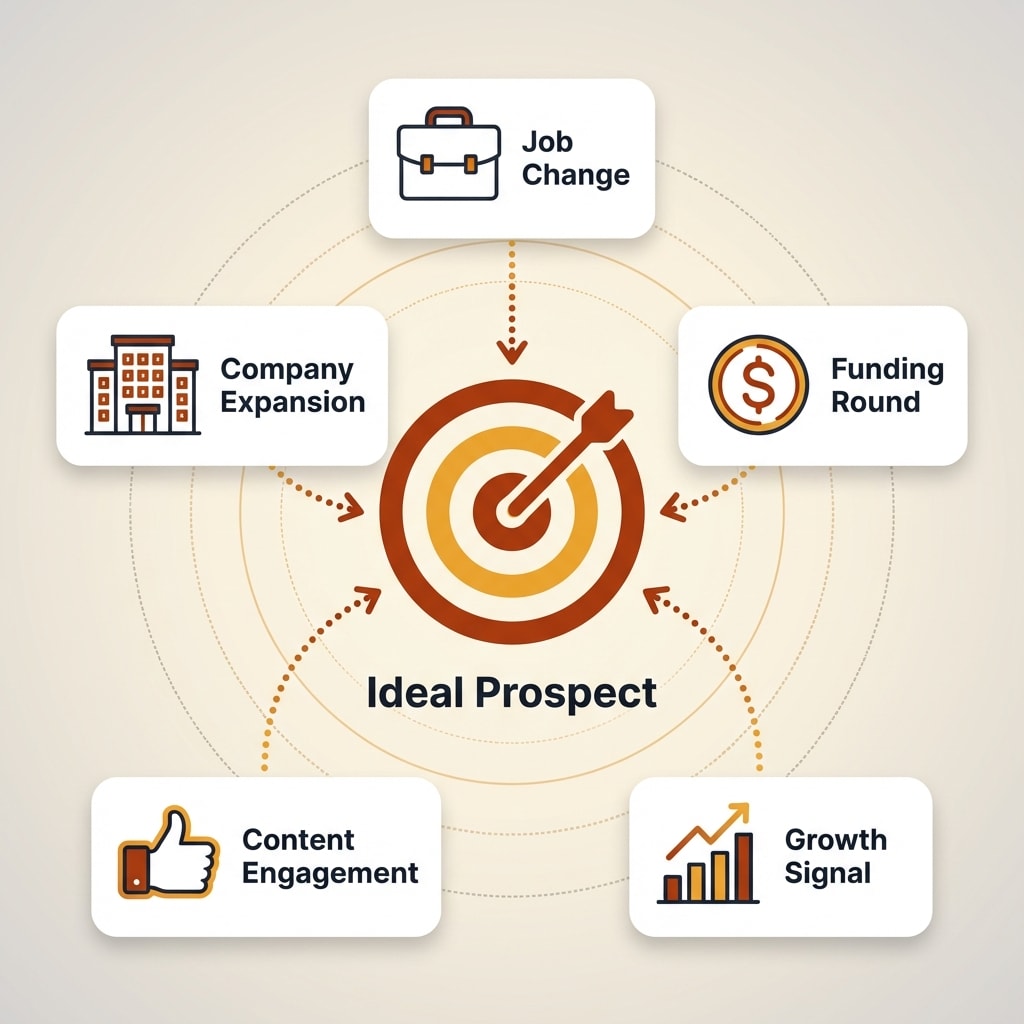
When a signal fires, the tool identifies the prospect, enriches their profile, and initiates personalized outreach, often combining LinkedIn and email in a single sequence.
The numbers back this up. Cold list outreach typically sees around 8 percent reply rates and 1.7 percent close rates. Warm outreach to prospects showing intent signals averages 47 percent reply rates and 14.6 percent close rates. That is not a marginal improvement — it is a different category of results.
The advantage here is efficiency. Instead of sending 500 connection requests and hoping for 15 responses, you send 50 highly targeted messages to people already showing buying behavior. You stay well within LinkedIn's limits because you do not need volume. You need precision.
If you want to understand this approach better, check out our breakdown of what an AI SDR is and how it compares to traditional outbound. We also wrote a detailed look at Gojiberry AI, one of the tools in this space. And for the underlying concept of identifying the right prospects at the right time, our guide to buyer intent data goes deep on the signals that matter.
This approach will not replace volume outreach for every business. But for founders and small sales teams who cannot afford to burn through LinkedIn accounts, it is worth serious consideration.
Common Mistakes That Get You Banned
I have seen enough LinkedIn accounts get restricted to spot the patterns. Here are the most common mistakes:
Sending too many connection requests too fast. This is the number one cause. People install a tool, set it to 50 requests per day on day one, and get flagged within a week. Start slow. Warm up your account over three to four weeks.
Using generic messages at scale. "I would love to add you to my network" sent 100 times in a day is textbook automation behavior. LinkedIn's systems catch this easily. Personalize every message and use spintax to create variation.
Ignoring low acceptance rates. If more than 70 percent of your connection requests go unanswered, LinkedIn notices. It means your targeting is off or your message is bad. Fix the problem instead of sending more.
Running browser extensions on your main account. Browser-based tools are the highest-risk option. If you are going to use one, do not run it on a LinkedIn account with years of connections and content. The downside of losing that account is too high.
Not withdrawing old pending requests. Pending invitations that sit for weeks count against you. Clean them up regularly. Withdraw anything older than two to three weeks.
Automating without engaging. If your account only sends connection requests and messages but never posts, comments, or reacts, it looks like a bot. Mix automation with real organic activity.
Ignoring LinkedIn's warnings. When LinkedIn sends you a warning that your activity looks automated, take it seriously. Pause everything for several days. Many people dismiss the first warning and lose their account on the second strike.
Frequently Asked Questions
How many LinkedIn messages can I send per day?
LinkedIn does not publish exact daily limits. Based on practitioner data, most accounts can safely send 20 to 25 connection requests per day. For messages to first-degree connections, free accounts can send roughly 50 per day while Sales Navigator accounts can send around 250. Accounts with a higher Social Selling Index tend to have healthier engagement patterns that result in fewer restrictions, though SSI itself does not directly increase quotas. Exceeding sustainable thresholds or sending in bursts can trigger temporary restrictions.
Is LinkedIn automation legal?
LinkedIn automation is legal in most jurisdictions. No law prohibits using software to send messages on a social platform. However, it does violate LinkedIn's Terms of Service, which ban automated or scripted data collection and messaging. The practical consequence is account restriction or ban, not legal action. Many businesses use automation tools, but they accept the platform risk. One caveat: if you are storing LinkedIn profile data from EU residents in your CRM or automation tool, that triggers GDPR obligations around data processing and consent.
What is the safest type of LinkedIn automation tool?
Cloud-based tools that run on dedicated IP addresses are generally considered safest. They operate from remote servers with built-in delays and activity limits that mimic human behavior. Browser-based extensions carry higher detection risk because LinkedIn can identify the code running in your browser.
Will LinkedIn Sales Navigator help me avoid automation limits?
Sales Navigator does not increase your connection request or messaging limits. It gives you better search filters and lead list management, which helps you target the right people. But the weekly cap of roughly 100 to 200 connection requests applies to all accounts regardless of subscription tier.
What is the best alternative to risky LinkedIn automation?
Intent-based prospecting tools represent a newer approach. Instead of automating mass outreach, they monitor buying signals like competitor engagement, job changes, and funding events to identify who is most likely to respond. This means you send fewer, better-targeted messages and stay well within LinkedIn's activity limits.
The Bottom Line
LinkedIn outreach automation works. The data backs it up, and the businesses using it are booking meetings and closing deals. But it works only if you respect the platform's boundaries.
Start with precise targeting. Write messages that sound like a real person wrote them. Warm up your account gradually. Set conservative daily limits. Monitor your acceptance and reply rates weekly. And if LinkedIn gives you a warning, listen to it.
The tools keep getting better. Cloud-based platforms are safer than they were a year ago. AI-powered intent tools are reducing the need for high-volume outreach entirely. The direction is clear: less spray-and-pray, more signal-driven precision.
Pick the approach that fits your business. Be patient with the warm-up. And never risk an account you cannot afford to lose.