A website crawler API is a managed service that extracts content from web pages and returns it as clean, structured data through a simple API call. It handles the technical challenges of web scraping, including JavaScript rendering, proxy rotation, anti-bot bypass, and rate limiting, so developers do not have to build and maintain scraping infrastructure themselves. Modern crawler APIs output data in LLM-ready formats like markdown and JSON, making them essential infrastructure for AI applications that need real-time web data for RAG pipelines, agents, and training datasets.
Every AI app that touches live web data faces the same problem: getting clean, structured content from websites that were built for humans, not machines.
The modern web is hostile to automated extraction. JavaScript-heavy single-page applications, anti-bot systems, CAPTCHAs, and rate limits make scraping far harder than it was five years ago. Over 21% of all websites now use Cloudflare's protection, and CAPTCHAs appear on more than a third of the top 100,000 sites. If you've tried scraping anything recently, you know the pain.
I've come across many projects where I have to scrape data and I often try to do it myself to save costs, but it ends up taking a ton of time anyway. The DIY approach works for simple static sites, but the moment you hit JavaScript rendering or anti-bot measures, you're in for weeks of infrastructure work.
The rise of RAG pipelines, AI agents, and LLM-powered tools has created massive demand for reliable web data extraction. A new category of developer tools has emerged to solve this, and understanding how they work will save you significant time and money.
This guide explains what web scraping APIs are, how they work under the hood, when you need one versus building your own scraper, and what to look for when evaluating options.
What Is a Website Crawler API?
A website crawler API is a managed service you call via HTTP to extract content from any URL. You send a URL, and you get back clean data in your preferred format: markdown, JSON, HTML, or even screenshots.
The core difference from traditional scraping is that the API provider handles all the infrastructure. Proxies, headless browsers, anti-bot detection, retries, rate limiting. You don't manage any of it. You make an API call and get data back.
Web scraping has existed for decades, starting with simple HTML parsers that pulled text from static pages. But the industry has shifted dramatically. Modern scraping APIs don't just extract raw data. They optimize for AI consumption. Output formats like clean markdown and structured JSON are designed specifically for LLM context windows, where every token counts.
This matters because raw HTML is full of navigation menus, ads, footers, scripts, and boilerplate that waste tokens and confuse language models. Converting HTML to markdown reduces token usage by 20-30%, and in some cases stripping to plaintext drops token counts by up to 99%. When you're paying per token for LLM API calls, that efficiency adds up fast.
The result is a new category: web data APIs built for AI. You send a URL, you get back LLM-ready content. No parsing. No cleaning. No infrastructure management.
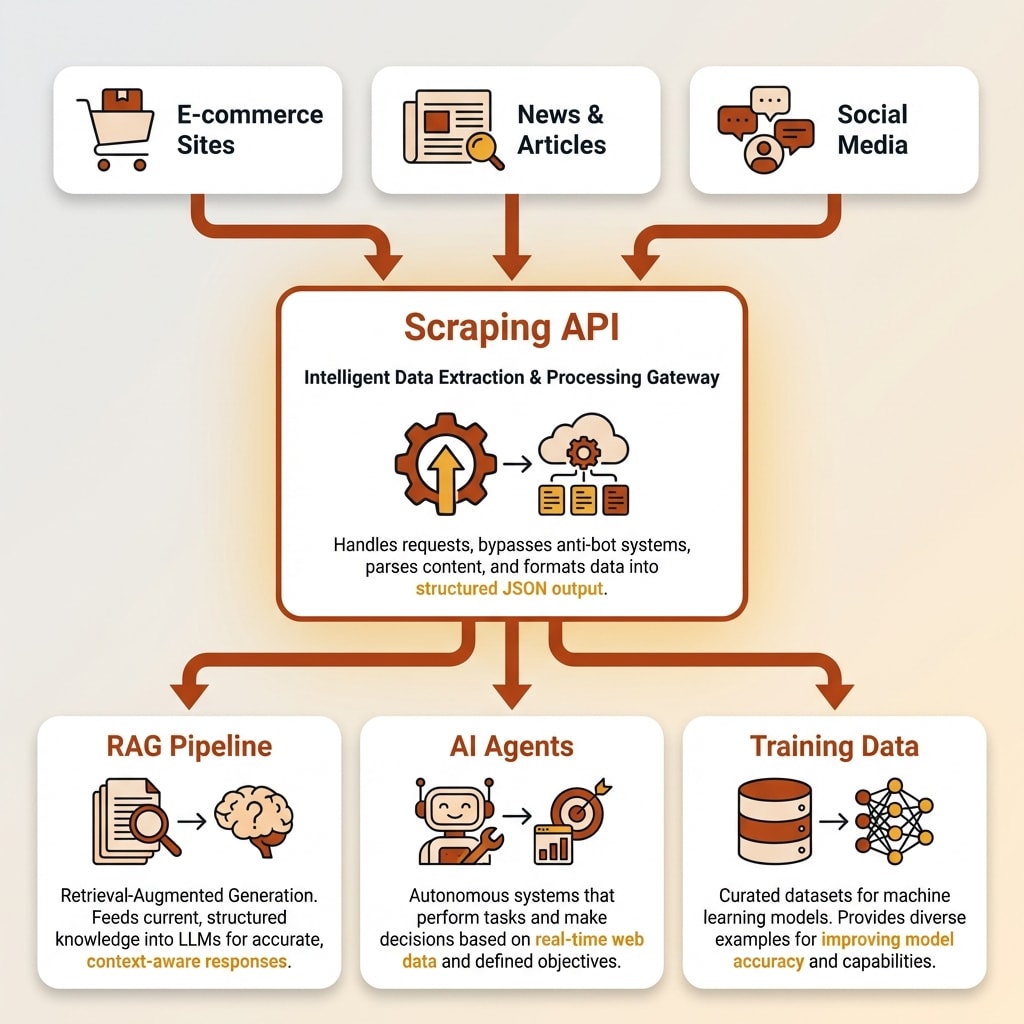
Why AI Applications Need Web Scraping APIs
RAG Pipelines and Knowledge Bases
Retrieval-Augmented Generation (RAG) systems need current, clean web content to ground LLM responses in facts. Without fresh data, your chatbot or AI assistant gives stale or hallucinated answers.
The problem is that raw HTML is garbage input for a language model. Navigation bars, ad scripts, cookie banners, and footer links all get included and waste context window space. A website crawler API that outputs clean markdown solves this "garbage in, garbage out" problem. You get just the main content, properly formatted, ready to chunk and embed.
Best practice for RAG is chunking content into roughly 400-512 tokens per segment, and retrieval quality drops noticeably beyond around 2,500 tokens per context. Clean markdown input makes both chunking and retrieval more effective.
AI Agents and Real-Time Data
Autonomous AI agents for research, sales prospecting, and coding need to browse and extract web data on the fly. They can't wait for manual data collection.
Model Context Protocol (MCP) integrations now let AI coding tools like Claude Code and Cursor access web data directly through a scraping API. You can set up the Firecrawl MCP server in minutes and give your AI assistant the ability to scrape, crawl, and search the web from inside your editor. The agent makes a single API call, triggers a headless browser behind the scenes, and gets clean JSON or markdown back. No HTML parsing step required.
Speed matters here. Sub-second scraping enables real-time agent workflows where an AI assistant can research a topic, pull live data, and synthesize findings without you switching tabs or writing any scraping code.
Training Data and Fine-Tuning
Pre-training and fine-tuning LLMs requires massive, clean text corpora from the web. GPT-3 was trained on 45 TB of text, most of it sourced from Common Crawl. Website crawler APIs can process millions of pages with consistent formatting, and the better ones include quality filtering and deduplication built in.
For teams building specialized models, a scraping API that outputs consistent, clean markdown across millions of pages is far more practical than trying to maintain a custom crawling pipeline.
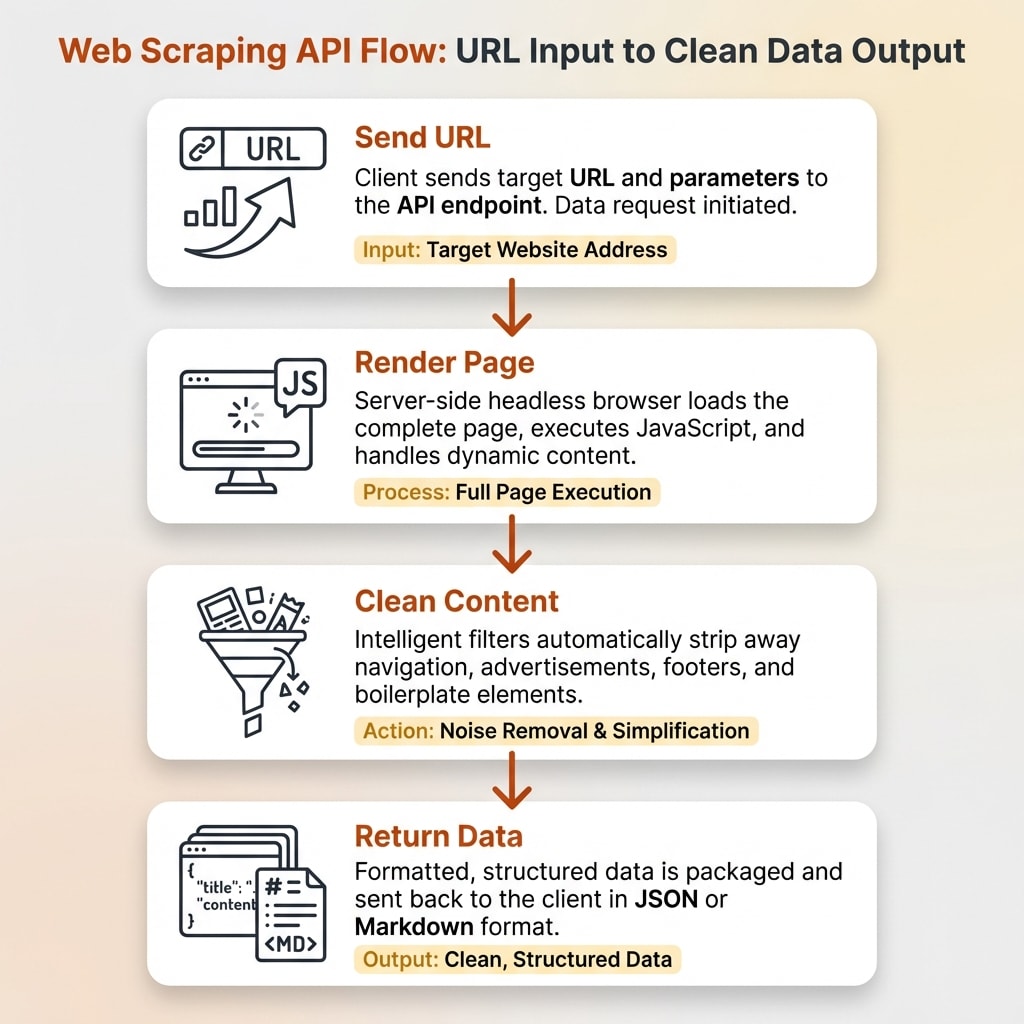
How Web Scraping APIs Work Under the Hood
JavaScript Rendering
Most modern websites use React, Vue, Angular, or other JavaScript frameworks. A simple HTTP request to these sites returns an empty shell because the actual content loads dynamically after JavaScript executes.
Scraping APIs solve this by running headless browsers, typically Chromium-based, in the cloud. They render the full page just like a real browser would, execute all JavaScript, wait for dynamic content to finish loading, and then extract the content. "Smart wait" features monitor network activity or watch for specific DOM elements so the API captures everything without unnecessary delays.
Without JavaScript rendering support, a scraper gets "empty responses from half of modern websites." That's not an exaggeration. The percentage of sites requiring JS execution for meaningful content has grown steadily, and any serious website crawler API handles this automatically.
Want to Hear From Me Weekly?
I'm putting together a weekly email with the real stuff. What's working, what's not, and the tools I'm actually using to grow. Not live yet, but you can grab a spot. Totally free!
Proxy Rotation and Anti-Bot Bypass
Websites use fingerprinting, rate limiting, and CAPTCHAs to block automated access. Over 50% of all website traffic is now automated bots, and sites have gotten aggressive about filtering them out.
Managed API services maintain pools of residential and datacenter proxies across dozens of countries. Some providers operate millions of IPs. They randomize browser fingerprints, including user-agent strings, screen resolution, language settings, and canvas rendering, to make each request look like a real user.
The API provider absorbs the ongoing arms race between scrapers and anti-bot systems. When Cloudflare updates its detection, the API team adjusts. When a site deploys new CAPTCHAs, the service integrates solving capabilities. You never see any of this. You just keep making the same API call and getting data back.
Content Cleaning and Output Formats
After rendering and extracting, the API strips away navigation, footers, ads, scripts, and boilerplate to return just the main content. This is where scraped data becomes useful for AI.
Common output formats include clean markdown, structured JSON, plain text, and screenshots. Some APIs support schema-based extraction where you define the exact data structure you want (using Pydantic or Zod schemas), and the API returns typed, structured data that matches your specification.
For AI applications, markdown is the sweet spot. It preserves document structure (headings, lists, emphasis) while being compact enough for LLM context windows. Firecrawl, for example, is built specifically around this AI-native approach, outputting clean markdown that can drop directly into a RAG pipeline with 96% web coverage.
DIY Scraping vs. Managed Website Crawler APIs
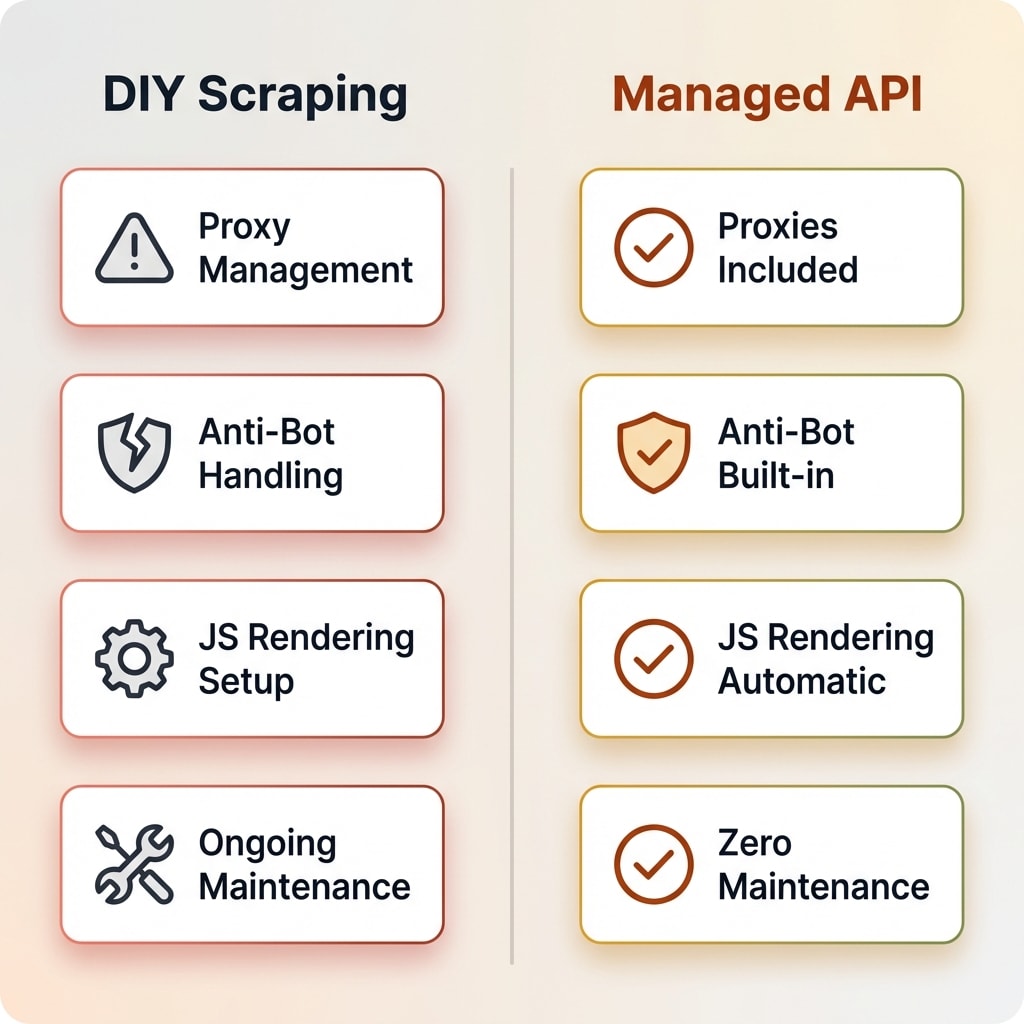
This is the decision most developers face: build your own scraping stack or pay for a managed service. I've done both, and the right answer depends on your situation.
| Factor | DIY (BeautifulSoup/Scrapy/Puppeteer) | Managed API |
|---|---|---|
| Setup time | Days to weeks | Minutes |
| Proxy management | You manage (or buy separately) | Included |
| Anti-bot handling | Manual, constantly breaking | Handled automatically |
| JavaScript rendering | Configure headless browser yourself | Built-in |
| Maintenance | Ongoing (sites change, blocks happen) | Provider handles it |
| Cost at low scale | Near-free (your compute) | $0-20/month |
| Cost at high scale | Server + proxy + time costs | $83-600+/month |
| Control | Total | API-dependent |
| Learning value | High | Low barrier |
When DIY Makes Sense
DIY scraping is the right call when you're scraping a small number of stable, simple sites. If the pages are static HTML without anti-bot protection, BeautifulSoup or Cheerio will get the job done in a few lines of code.
It's also valuable for learning. Building a scraper teaches you how the web works at a level that using an API never will. If you have more time than money, and the sites you're targeting are cooperating, DIY is fine.
Highly custom extraction logic that APIs don't support is another reason to stay DIY. If you need to interact with a site in very specific ways, click through multi-step flows, or extract data from unusual page structures, a custom Puppeteer or Playwright script gives you complete control.
When a Managed API Wins
The math changes when you're scraping at scale, hitting anti-bot protections, or building AI applications that need consistent output. One concrete example from a 2026 industry report: a team that moved from a manual scraper to a managed API increased throughput by roughly 40x (from 50 to 2,000 pages per hour) and "almost eliminated" scraper breakages.
Developer time is the hidden cost of DIY. If you spend 10 hours per month maintaining scrapers at $50 per hour, that's $500 in hidden costs before you've counted servers or proxies. A managed API at $16-83 per month eliminates that entire category of work.
Some managed APIs, like Firecrawl, also offer open source self-hosting for teams that want managed features with more control over their infrastructure. The open source version won't have every cloud feature, but it's a middle ground between full DIY and a subscription.
What to Look for When Choosing a Web Scraping API
If you're evaluating website crawler API options, here are the criteria that actually matter:
-
Web coverage rate. What percentage of sites can it actually scrape? JavaScript-heavy sites, single-page applications, and protected sites are the real test. Any API can scrape a static blog.
-
Output format flexibility. Does it output markdown, JSON, structured data? Can you define extraction schemas? For AI use cases, markdown output is non-negotiable.
-
Speed and concurrency. How fast are individual requests? How many concurrent requests can you run? This matters at scale and for real-time agent workflows.
-
Anti-bot capabilities. Can it handle CAPTCHAs, browser fingerprinting, and rate limiting automatically? Ask about success rates on protected sites, not just simple ones.
-
Pricing model. Credit-based versus pay-per-use versus subscription. Watch out for providers that bill for failed requests or charge extra for JavaScript rendering.
-
AI-native features. Markdown output, LLM extraction endpoints, agent integrations, MCP support. These separate modern web data APIs from legacy scraping tools.
-
Open source option. Can you self-host if needed? Is there an active community and ongoing development? This gives you a fallback if the managed service changes pricing or shuts down.
-
Compliance. Does the provider respect robots.txt by default? SOC 2 compliance matters for enterprise use cases.
Common Use Cases for Website Crawler APIs
Here's where teams actually use these tools in practice:
-
Competitive intelligence. Monitor competitor pricing, product launches, and content changes. Set up recurring crawls and diff the results to spot changes automatically.
-
Lead enrichment. Extract company data, contact information, and firmographics from business websites. Feed this into your CRM or sales pipeline.
-
Content research and SEO auditing. Crawl sites to analyze content structure, internal links, and technical SEO elements. I use a scraping API for exactly this when building content strategies.
-
E-commerce price monitoring. Track prices across marketplaces and competitor stores. Alert when a competitor drops prices or adds new products.
-
AI knowledge bases. Build and maintain knowledge bases with current web data for RAG chatbots and AI assistants.
-
Data migration. Extract content from legacy platforms for migration to new systems. Particularly useful when the old platform has no export functionality.
Something New Is Coming...
A weekly breakdown of what's working across SaaS, ecommerce, and online marketing. The kind of stuff I'd tell a friend. Not launched yet, but you can grab a spot. Totally free!
Frequently Asked Questions
Are there free website crawlers online?
Yes. Open source tools like Scrapy (Python) and Crawlee (JavaScript) are free to run on your own infrastructure. Some managed APIs offer free tiers: Firecrawl gives 500 one-time credits, and others provide free starter credits or pay-per-use options with no subscription. For casual use, browser extensions and simple HTTP tools work fine. For anything beyond light testing, you'll likely need a paid plan or your own server infrastructure.
Is web scraping legal?
Generally, yes. Scraping publicly accessible information is legal in most jurisdictions. The 2022 US Ninth Circuit ruling in hiQ Labs v. LinkedIn confirmed that scraping public data does not violate the Computer Fraud and Abuse Act. However, you should always respect robots.txt directives, terms of service, and data protection regulations like GDPR. Avoid scraping personal data without a lawful basis, and never bypass authentication systems.
What is the difference between web scraping and web crawling?
Crawling is discovering and indexing pages across a website by following links. Scraping is extracting specific data from those pages. A "crawler API" typically does both: it crawls a site to find pages, then scrapes each page for content. Most modern APIs combine both capabilities into a single service.
Can web scraping APIs handle JavaScript-heavy websites?
Yes. Modern scraping APIs use headless browsers (typically Chromium-based) to fully render JavaScript before extracting content. This handles React, Vue, Angular, and other SPA frameworks. The API manages browser instances, waits for dynamic content to load, and returns the fully rendered page content.
How much does a web scraping API cost?
Pricing varies widely. Free tiers typically offer 500 to 3,000 pages per month. Paid plans range from $16 to $600+ per month depending on volume, with per-page costs between $0.001 and $0.01. Most providers use a credit-based system where one credit equals one page scraped. Beyond the subscription, watch for hidden costs like overage fees and charges for JavaScript rendering.
Making the Right Choice for Your Project
A website crawler API removes the hardest part of extracting clean data from websites. For AI applications in particular, these tools have become essential infrastructure because LLMs need clean, structured data, not raw HTML full of navigation menus and ad scripts.
If you're building an AI app that needs web data, starting with a managed API saves weeks of infrastructure work. If you're scraping a handful of simple pages, DIY tools like BeautifulSoup or Scrapy are perfectly adequate.
For a detailed look at one of the leading AI-native options, read our full breakdown of Firecrawl where I cover pricing, features, and real-world performance after months of daily use.
The best way to evaluate any website crawler API is to start with a free tier. Test the output quality yourself before committing to a paid plan, and pay attention to how well it handles the specific sites you need to scrape.