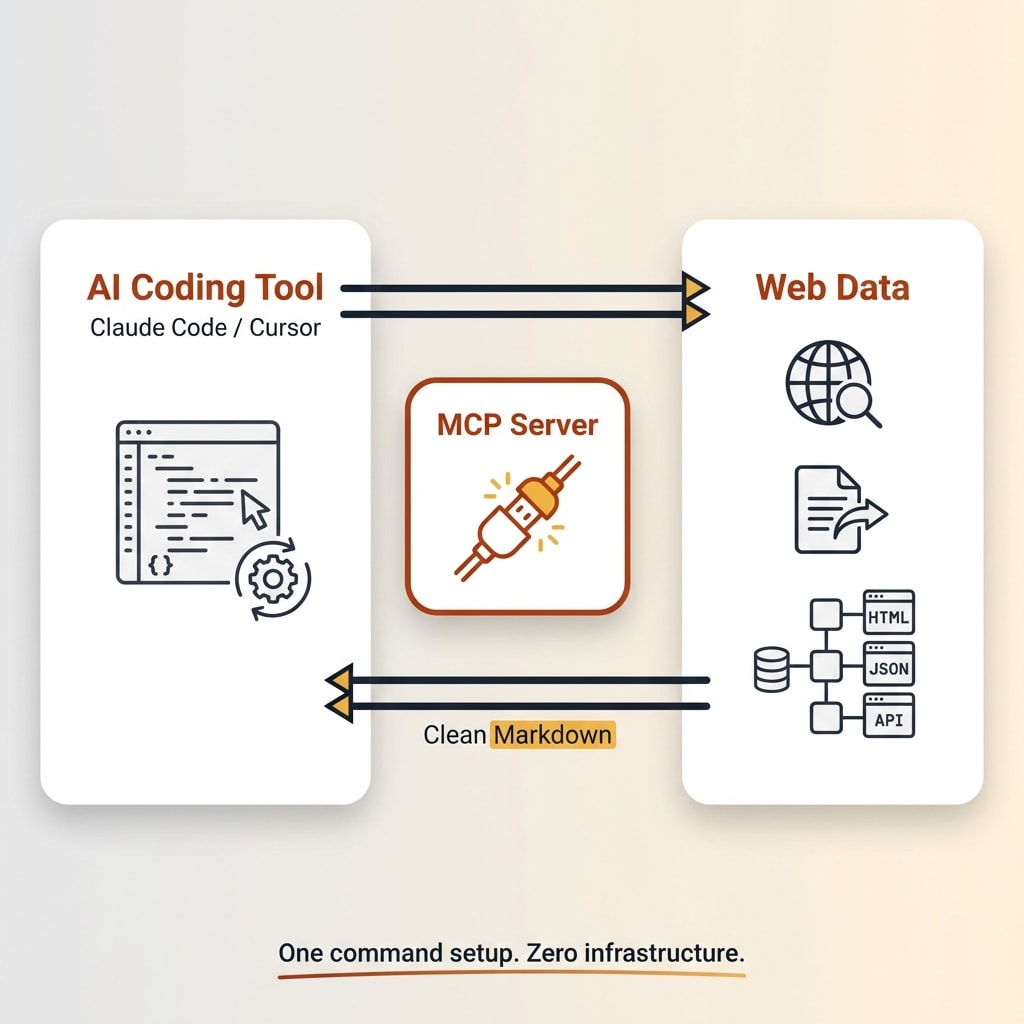
The Firecrawl MCP server is a Model Context Protocol integration that gives AI coding tools like Claude Code and Cursor live web scraping, search, and data extraction capabilities through Firecrawl's API. Setup requires a Firecrawl API key and a single configuration command or JSON snippet. Once connected, the AI agent can scrape pages to clean markdown, search the web, crawl entire sites, and extract structured data without leaving the editor. The free tier includes 500 credits for testing before upgrading.
AI coding tools are powerful, but they can't see the live web. Claude Code can refactor your entire codebase and Cursor can generate components from a description, but neither can look up current documentation, check a competitor's pricing page, or pull data from a live URL. You end up switching tabs constantly, copy-pasting content into chat, and breaking your flow.
The Firecrawl MCP server fixes that. It connects Firecrawl's web scraping API to your AI coding tool through the Model Context Protocol, giving your assistant the ability to scrape, search, and crawl the web on its own.
I use the Firecrawl MCP server daily in Claude Code. It's the primary reason I pay for Firecrawl. This guide walks through the exact setup for both Claude Code and Cursor, plus the real workflows where it saves me the most time.
What Is the Firecrawl MCP Server?
MCP (Model Context Protocol) is an open standard created by Anthropic that lets AI tools connect to external services. Think of it as a universal plugin system. Instead of hard-coding API integrations, the AI discovers available tools at runtime and calls them when needed. As of late 2025, there are over 10,000 public MCP servers covering everything from databases to cloud services.
The Firecrawl MCP server is one of those servers. It's an open-source Node.js package (firecrawl-mcp on npm, MIT licensed, 5,600+ GitHub stars) that wraps Firecrawl's web scraping API into MCP tools your AI assistant can call directly. Once it's connected, your AI can scrape a URL to clean markdown, search the web, crawl an entire site, or extract structured data, all from inside your editor.
You can run it locally via npx (no global install needed) or connect to Firecrawl's cloud MCP endpoint. If you're new to web scraping APIs, that explainer covers the fundamentals. For a deeper look at the full Firecrawl platform, pricing, and my honest take after months of use, check out my Firecrawl review.
Prerequisites
Before you start, you need three things:
- A Firecrawl API key. Sign up at firecrawl.dev. The free tier gives you 500 one-time credits, enough to test everything in this guide.
- Claude Code or Cursor installed. For Claude Code, install via
npm install -g @anthropic-ai/claude-code. For Cursor, version 0.45.6 or later. - Node.js installed. The MCP server runs through npx, which ships with Node.js.
That's it. Setup takes about two minutes.
How to Set Up Firecrawl MCP in Claude Code
Step 1: Get Your Firecrawl API Key
Head to firecrawl.dev/app, create an account, and copy your API key from the dashboard. The free tier includes 500 credits, which is enough for a solid test run.
Step 2: Add the MCP Server
Run this single command in your terminal:
claude mcp add firecrawl -e FIRECRAWL_API_KEY=your-api-key -- npx -y firecrawl-mcp
That's the entire setup. This command registers the Firecrawl MCP server with Claude Code and passes your API key as an environment variable. The config gets stored in ~/.claude.json under the mcpServers key.
By default, the server is added to the local scope (current project only). If you want it available globally across all projects, add --scope user:
claude mcp add firecrawl --scope user -e FIRECRAWL_API_KEY=your-api-key -- npx -y firecrawl-mcp
Step 3: Verify It Works
Start a new Claude Code session (or restart your current one). Type /mcp to see all active MCP servers. You should see firecrawl listed with a green status.
Test it with a real prompt: "Search for the latest Next.js 15 features." Claude Code should automatically use the Firecrawl search tool, pull live results, and summarize them for you.
If you need to remove the server later, run claude mcp remove firecrawl.
How to Set Up Firecrawl MCP in Cursor
Step 1: Get Your Firecrawl API Key
Same process as above. Sign up at firecrawl.dev, grab your API key from the dashboard.
Step 2: Add the MCP Configuration
Open Cursor and go to Settings > Features > MCP Servers. Click "+ Add new global MCP server" and paste this JSON config:
{
  "mcpServers": {
    "firecrawl-mcp": {
      "command": "npx",
      "args": ["-y", "firecrawl-mcp"],
      "env": {
        "FIRECRAWL_API_KEY": "YOUR-API-KEY"
      }
    }
  }
}
Replace YOUR-API-KEY with your actual key and save.
Note: Cursor's MCP settings UI has changed between versions. In v0.45.6, you fill in separate fields for Name, Type, and Command. In v0.48.6+, you paste the full JSON block. Both approaches work.
Want to Hear From Me Weekly?
I'm putting together a weekly email with the real stuff. What's working, what's not, and the tools I'm actually using to grow. Not live yet, but you can grab a spot. Totally free!
Step 3: Restart and Test
Restart Cursor completely (not just a window reload). Open Composer with Cmd+L (or Ctrl+L on Windows), select Agent mode, and test with something like: "Scrape firecrawl.dev and tell me what it does."
Cursor's agent will automatically pick up the Firecrawl tools and use them when a prompt involves web data.
Windows note: If npx fails on Windows, use this command format instead:
cmd /c "set FIRECRAWL_API_KEY=your-api-key && npx -y firecrawl-mcp"
What You Can Actually Do With Firecrawl MCP
The tool list is nice, but what matters is what you actually use them for. Here are the workflows I rely on most.
Pull Live Documentation While You Code
This is where the Firecrawl MCP server pays for itself. You're building a Stripe integration and need the current webhook verification docs. Instead of switching to a browser, finding the right page, and copy-pasting, you just tell your AI: "Crawl the Stripe API docs for payment intents and summarize the setup."
The AI scrapes the live documentation and works with current information instead of relying on training data that might be months out of date.
Research Before Building
Before I start any project, I have Claude Code research the space first. "Search for the best React form libraries in 2026 and compare their bundle sizes." The firecrawl_search tool searches the web and scrapes the top results, so the AI gives you a grounded answer based on current data, not just what it remembers from training.
This is the tool I use most. It searches the web AND scrapes the results in one call, so you don't need to know specific URLs.
Scrape Data for Your App
Need product data from a catalog? Pricing tables from a competitor? The AI can scrape specific pages and return clean markdown you can work with immediately. The firecrawl_agent tool can even navigate complex sites autonomously given a natural language prompt.
Extract Structured Data
Tell your AI: "Extract the name, price, and rating from these five product pages as JSON." The firecrawl_extract tool pulls structured data matching a schema you define. Clean output you can drop directly into your code.
Firecrawl MCP Tools Reference
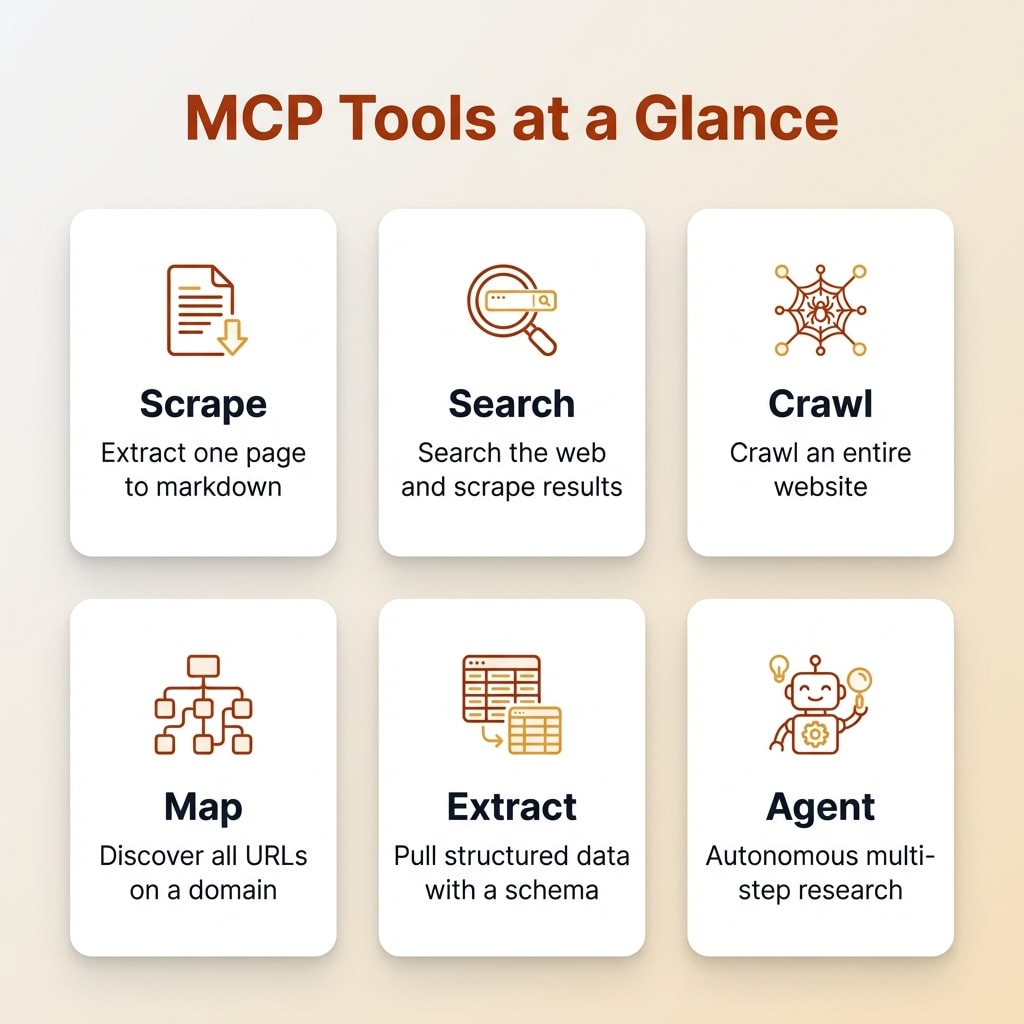
Here's a quick reference for what each tool does:
| Tool | What It Does | Best For |
|---|---|---|
firecrawl_scrape | Scrape a single URL to markdown or JSON | Known pages, documentation |
firecrawl_search | Search the web and scrape results | Research, open-ended questions |
firecrawl_crawl | Crawl an entire site (depth-limited) | Documentation sites, full site analysis |
firecrawl_map | Discover all URLs on a domain | Scoping a site before crawling |
firecrawl_extract | Extract structured data with a schema | Product data, pricing, specific fields |
firecrawl_agent | Autonomous multi-step web research | Complex research across multiple sources |
Each operation uses Firecrawl credits. One credit per page scraped, about 2 credits for a 10-result search query. The free tier gives you 500 credits. Paid plans start at $16 per month for 3,000 credits.
Troubleshooting Common Issues
"npx: command not found"
You need Node.js installed. Download it from nodejs.org. The npx command ships with Node.js automatically.
API Key Errors
Double-check that your API key is correct with no extra spaces or quotes. You can verify your key at firecrawl.dev/app/api-keys. If you get a 401 error, the key is wrong or expired.
Something New Is Coming...
A weekly breakdown of what's working across SaaS, ecommerce, and online marketing. The kind of stuff I'd tell a friend. Not launched yet, but you can grab a spot. Totally free!
MCP Server Not Showing in Cursor
Make sure your Cursor version is 0.45.6 or later. Try a full restart of the application, not just a window reload. Check the JSON syntax in your MCP config, a missing comma or bracket will silently fail.
Rate Limit or Credit Errors
The free tier has 500 one-time credits. When they're gone, you'll get a 402 error. The MCP server has built-in retry logic with exponential backoff for rate limits (429 errors), so temporary throttling resolves itself. Monitor your credit usage in the Firecrawl dashboard.
Scrape Failures on Certain Sites
Some sites block scrapers. Reddit, Instagram, and TikTok are known limitations. Firecrawl handles most sites well, but social media platforms are generally excluded. For sites behind login walls, the newer Browser Sandbox tools may help.
Frequently Asked Questions
Is the Firecrawl MCP server free?
The Firecrawl MCP server software is free and open source (MIT license). You need a Firecrawl API key to use it with the cloud API, which includes a free tier of 500 credits. Paid plans start at $16 per month for 3,000 credits. Self-hosted Firecrawl requires no API key.
Does Firecrawl MCP work with Windsurf?
Yes. Add the same JSON configuration to your Windsurf model_config.json file. The setup is nearly identical to Cursor, using npx to run the firecrawl-mcp package with your API key as an environment variable.
What is the difference between Firecrawl MCP and the Firecrawl API?
The Firecrawl MCP server is a wrapper that exposes Firecrawl's API capabilities as MCP tools that AI coding assistants can use directly. Instead of writing API calls in your code, the AI agent calls the tools automatically when it needs web data. The underlying API is the same.
How many credits does Firecrawl MCP use per request?
One credit per page scraped. Crawling a 50-page site uses 50 credits. The search tool uses about 2 credits for a 10-result query. The extract and agent tools may use additional credits depending on complexity.
Can I use Firecrawl MCP without an API key?
Yes, if you self-host Firecrawl. Set the FIRECRAWL_API_URL environment variable to your self-hosted instance URL and omit the API key. The open-source version is available on GitHub.
Start Using Firecrawl MCP
The Firecrawl MCP server is the single biggest quality-of-life improvement I've made to my AI coding workflow this year. It turns Claude Code from a tool that reasons about your project into one that can actually see the live web. Setup takes one command for Claude Code or a JSON snippet for Cursor, and you're up and running in minutes.
The workflows that save me the most time: pulling live documentation while building, researching tools and libraries before committing to them, and scraping data I'd otherwise spend an hour collecting manually. If you use AI coding tools daily, this is worth setting up.
You can sign up for Firecrawl and get 500 free credits to test it. That's enough to run through every workflow in this guide and decide if it fits your setup.