AI dictation uses two layers of technology to turn speech into polished text. First, a speech recognition model like OpenAI's Whisper converts audio into a raw transcript. Then, a large language model cleans up that transcript by fixing grammar, removing filler words, and applying formatting. When OpenAI released Whisper as open-source software in 2022, it gave every developer access to near-human-level transcription for free. That single event explains why dozens of AI dictation apps appeared almost overnight and why accuracy has improved so dramatically.
Five years ago, voice dictation meant talking slowly at your phone and watching it butcher every third word. You had to enunciate like a news anchor, pause for punctuation commands, and still go back to fix half the output. Now you can ramble for two minutes with filler words, mid-sentence corrections, and half-formed thoughts, and get back clean, formatted text. Something fundamental changed.
Most people using AI dictation have no idea what is actually happening between their voice and the text on screen. The marketing says "AI-powered" and leaves it at that. But the underlying technology is genuinely interesting, and understanding it makes you a much smarter buyer when evaluating tools in this space.
This article breaks down the actual technology stack behind modern voice to text AI. You'll learn how speech recognition models work, why OpenAI's Whisper release in 2022 was the inflection point that created this entire category, and what separates a free dictation tool from a $15/month product. I use AI dictation daily across my ecommerce business, software development, and content creation, so this comes from hands-on experience rather than spec sheets.
The Old Way: Why Traditional Dictation Was Terrible
To appreciate what changed, you need to understand how bad things used to be.
I remember Dragon NaturallySpeaking arriving on the shelves when I worked at PC World in the UK as a teenager. Big red boxes with a woman wearing a headset on the front, because you needed a headset to use it. I took it home, tried it, and it was absolutely terrible. I spent more time correcting the transcription than I would have saved by not typing. Maybe it was user error. I was young. But the experience was bad enough that I didn't touch voice dictation again for over a decade.
Dragon launched in 1997 as the first continuous-speech dictation engine and dominated the market for over 20 years because nothing else came close. But "dominating" the dictation market meant selling $699 software that required you to train it to your voice, speak at a controlled pace, and manually correct errors until it learned your patterns. Dragon was powerful for professionals who invested the time. For everyone else, it was unusable.
Then came the built-in options. Apple added dictation to macOS in 2012. Google launched voice typing for Android in 2011. Microsoft built speech recognition into Windows. These were free but severely limited. They needed an internet connection, had short time limits, and produced literal transcriptions. If you wanted a comma, you had to say "comma." If you said "um," it typed "um."
The core problem with all traditional ai dictation software was the same. It was a one-step process. Speech went in, a literal transcript came out. No intelligence. No cleanup. No understanding of what you actually meant versus what you literally said. You had to speak like a robot to get usable text, which defeated the entire purpose of talking instead of typing.
Then two things happened that changed everything. Transformer-based AI models got remarkably good at understanding language. And OpenAI gave away the best speech recognition model ever built.
How Modern AI Dictation Actually Works
Here is what actually happens between your voice and the polished text on screen. Modern ai dictation uses a layered architecture, and understanding each layer explains everything about the market.
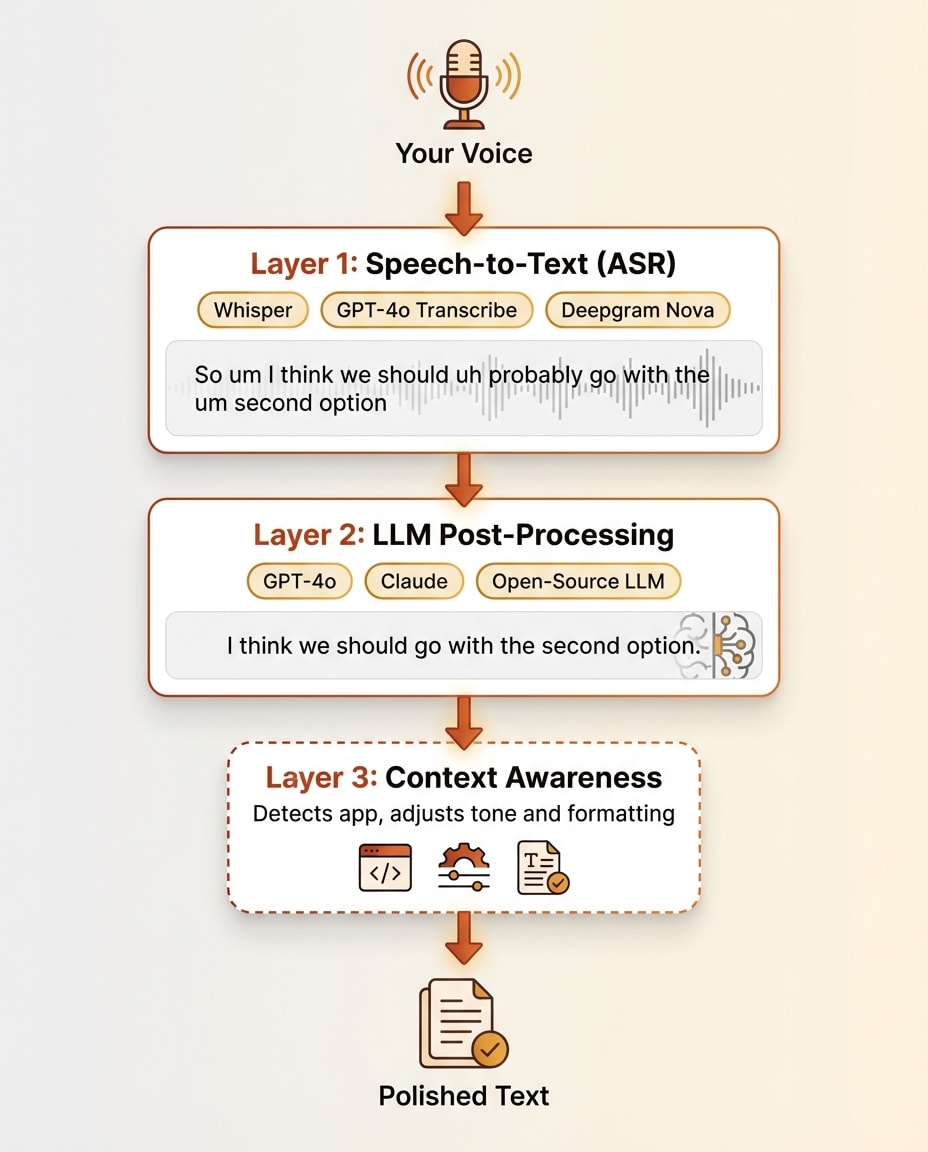
Layer 1: Speech-to-Text (The Transcription Engine)
The first layer converts your audio waveform into raw text. This is automatic speech recognition, or ASR.
In September 2022, OpenAI released Whisper. It's an encoder-decoder transformer model trained on 680,000 hours of multilingual audio scraped from the web. The model is open-source under an MIT license, meaning anyone can download, run, and build on it for free. It has over 95,000 GitHub stars.
The numbers tell the story. Whisper achieves a 3.96% word error rate on English. For context, human transcribers typically hit a 4-5% error rate on the same audio. A machine matching human-level transcription accuracy was a milestone that most researchers did not expect to arrive this soon.
OpenAI followed Whisper with GPT-4o Transcribe in 2025, which pushed the word error rate down to 2.46%. That model is not open-source. It runs through OpenAI's API at $0.006 per minute. Other players in the space include Deepgram Nova, NVIDIA Parakeet for on-device processing, and Aqua Voice's proprietary Avalon model.
But here is the key insight about Layer 1. It gives you a raw transcript. Accurate, yes. But messy. Every "um," "uh," "like," and "you know" comes through. False starts stay in. Self-corrections remain. Run-on sentences are transcribed faithfully. The transcript is precise but not polished. This is where traditional dictation stopped. Modern AI dictation keeps going.
Layer 2: LLM Post-Processing (The Intelligence Layer)
The raw transcript from Layer 1 gets passed through a large language model. This is GPT-4o, Claude, or an open-source alternative running behind the scenes. This second layer does the work that makes voice to text AI feel magical.
The LLM removes filler words. It fixes grammar and punctuation. It detects self-corrections ("actually, I meant Tuesday not Monday") and applies the correction. It adds paragraph breaks and structural formatting. It can execute voice commands like "make that bold" or "new paragraph." Some tools let power users customize the system prompt that controls how the LLM processes their text, adjusting tone, format, and behavior.
This is what separates AI dictation from old-school dictation. Traditional tools only had Layer 1. You spoke, you got a transcript, you manually cleaned it up. Modern tools stack Layer 2 on top, and the cleanup happens automatically in about one second.
Layer 3 (Optional): Context Awareness
Some advanced tools add a third layer. They become aware of what is on your screen and adjust their behavior accordingly.
Wispr Flow detects which application you are in and changes formatting to match. Formal sentence structure for email. Casual tone for Slack. Technical formatting for code editors. SuperWhisper captures text from your active input field for deeper context. Aqua Voice reads your screen content to improve transcription accuracy of domain-specific terms.
This is the frontier of ai dictation software. Not just understanding what you said, but understanding where you said it and what you were working on when you said it.
Want to Hear From Me Weekly?
I'm putting together a weekly email with the real stuff. What's working, what's not, and the tools I'm actually using to grow. Not live yet, but you can grab a spot. Totally free!
Why Whisper Changed Everything
This is the part of the story that nobody in the space talks about openly, but it explains the entire market.
In September 2022, OpenAI released Whisper as open-source software. Anyone could download it, run it on their own hardware, and build products on top of it. No API costs for the base model. No licensing fees. Just a state-of-the-art speech recognition system, free to the world.
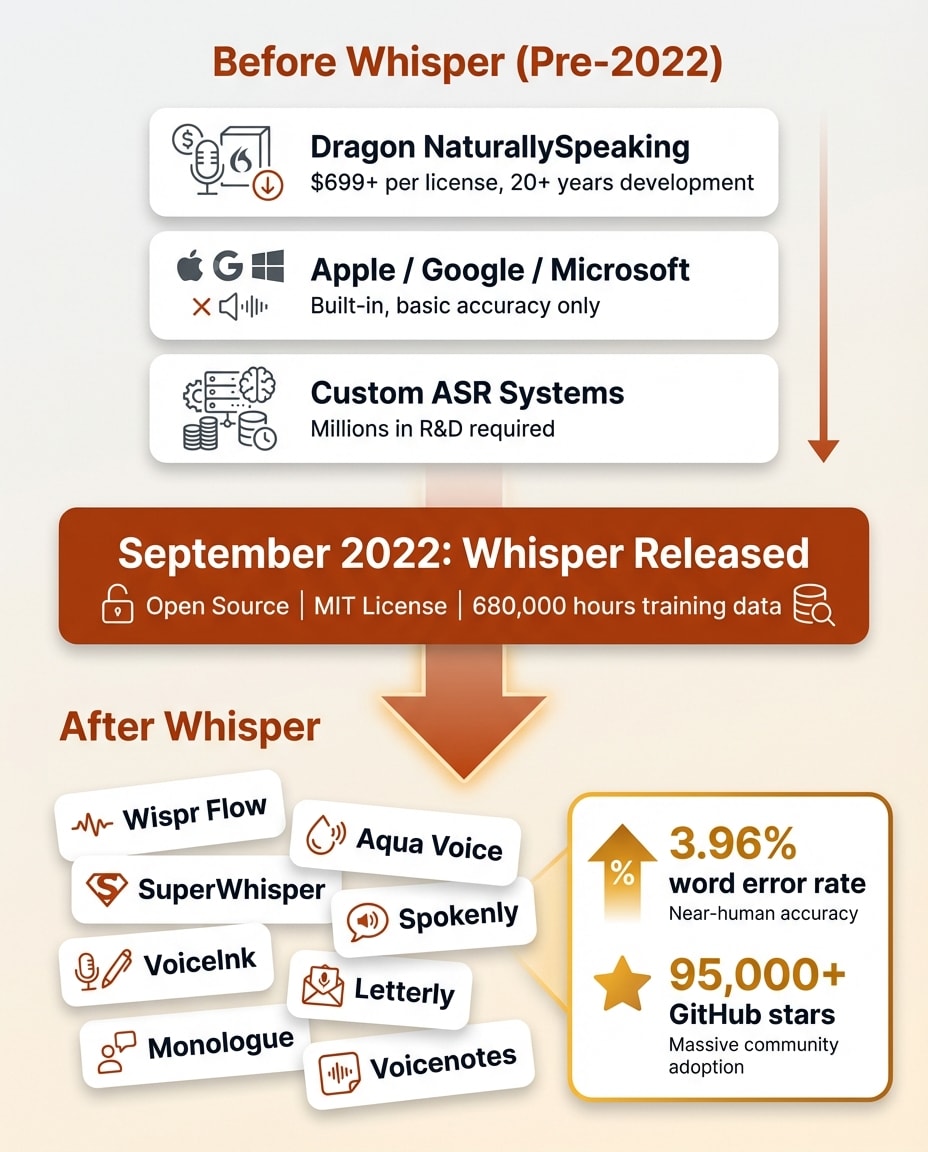
To understand why this mattered, consider what came before. Building a competitive speech recognition system used to require massive proprietary datasets, specialized machine learning teams, and years of development. Dragon spent over three decades and hundreds of millions of dollars getting their accuracy where it was. Google and Apple built proprietary systems into their operating systems with billions in R&D behind them.
After Whisper, a solo developer could download the model, wrap it in a simple interface, and ship an ai dictation app that matched or beat what Apple and Google built into their operating systems. The transcription layer, the hardest part of the entire problem, became free overnight.
The accessibility of this technology is staggering. You could open a terminal session with Claude Code right now and ask it to transcribe a YouTube video, completely free, with 90%+ accuracy that's good enough for most use cases. Then ask it to translate the transcript into another language. Instant translation of foreign language content at near-zero cost. That was unthinkable even five years ago. The space sometimes feels like an indie dev first SaaS, because the barrier to building on Whisper is so low. Throughout running online businesses, I've used transcription tools in all sorts of capacities, and it's amazing to think that many of those tools are now either obsolete or having to pivot because of how good this has become.
This is why there are suddenly dozens of dictation apps. Wispr Flow, Aqua Voice, SuperWhisper, Spokenly, VoiceInk, Letterly, Monologue, Voicenotes. Every single one of these launched after Whisper's release. The timing is not a coincidence. I cover one of the most polished products built on this architecture in my Wispr Flow review.
Since the transcription layer is effectively commoditized, developers now compete on Layer 2 and Layer 3. The quality of the LLM cleanup. The speed of processing. The UX of mode switching. Custom vocabulary handling. Platform polish and integration depth. The raw transcription is solved. The art of building a successful product around it is the additional AI layer and logic on top.
The pricing structure of the market reflects this perfectly. Free dictation tools like Apple Dictation, Google voice typing, and Speechnotes run on basic Whisper or browser APIs without LLM post-processing. Paid tools at $12-15 per month add the intelligence layer. That is the entire pricing distinction. You are paying for Layer 2.
What Separates a Whisper Wrapper From a Real Product
Now that you understand the architecture, here is what to look for when evaluating any ai dictation app.
The Features That Actually Matter
LLM processing quality. Does the app just transcribe, or does it intelligently clean up your speech? Can it handle self-corrections where you changed your mind mid-sentence? Does it remove filler words without removing meaning? The gap between a basic Whisper wrapper and a tuned LLM pipeline is enormous.
Speed. The round-trip time from when you stop speaking to when cleaned text appears. Milliseconds matter here. Both the transcription speed and the LLM processing speed contribute to the total latency. Anything over two seconds starts to feel sluggish.
Context awareness. Does the tool know what application you are in? Can it read your screen? Does it adjust formatting automatically based on context? This is the Layer 3 capability that separates the best tools from the rest.
Custom vocabulary. Can you teach it names, technical terms, and brand names? Wispr Flow auto-learns from your corrections over time. Aqua Voice has a manual custom dictionary. Dragon built an empire on this single feature. If you work in any specialized domain, custom vocabulary support is essential.
Privacy. Where does your audio go? Local processing through on-device models like NVIDIA Parakeet keeps everything on your machine. Cloud processing through Whisper API or GPT-4o sends audio to external servers. Some tools let you choose. This matters more for some users than others, but it is worth understanding the tradeoff.
Platform polish. Keyboard shortcuts, mode switching, integration with your existing workflow. This is where small teams differentiate. The core technology is the same across products. The experience of using it every day is not.
The Free Tier Reality
Several free tools rank in the top 10 search results for "ai dictation." Speechnotes and Dictation.io are browser-based and cost nothing. They use Google's Web Speech API or basic Whisper without any LLM post-processing layer.
What you get is a literal transcript. It works for quick notes where you will clean things up yourself afterward. It does not turn your rambling into polished prose. For a broader comparison of free and paid options, including built-in OS tools, see my guide to dictation software.
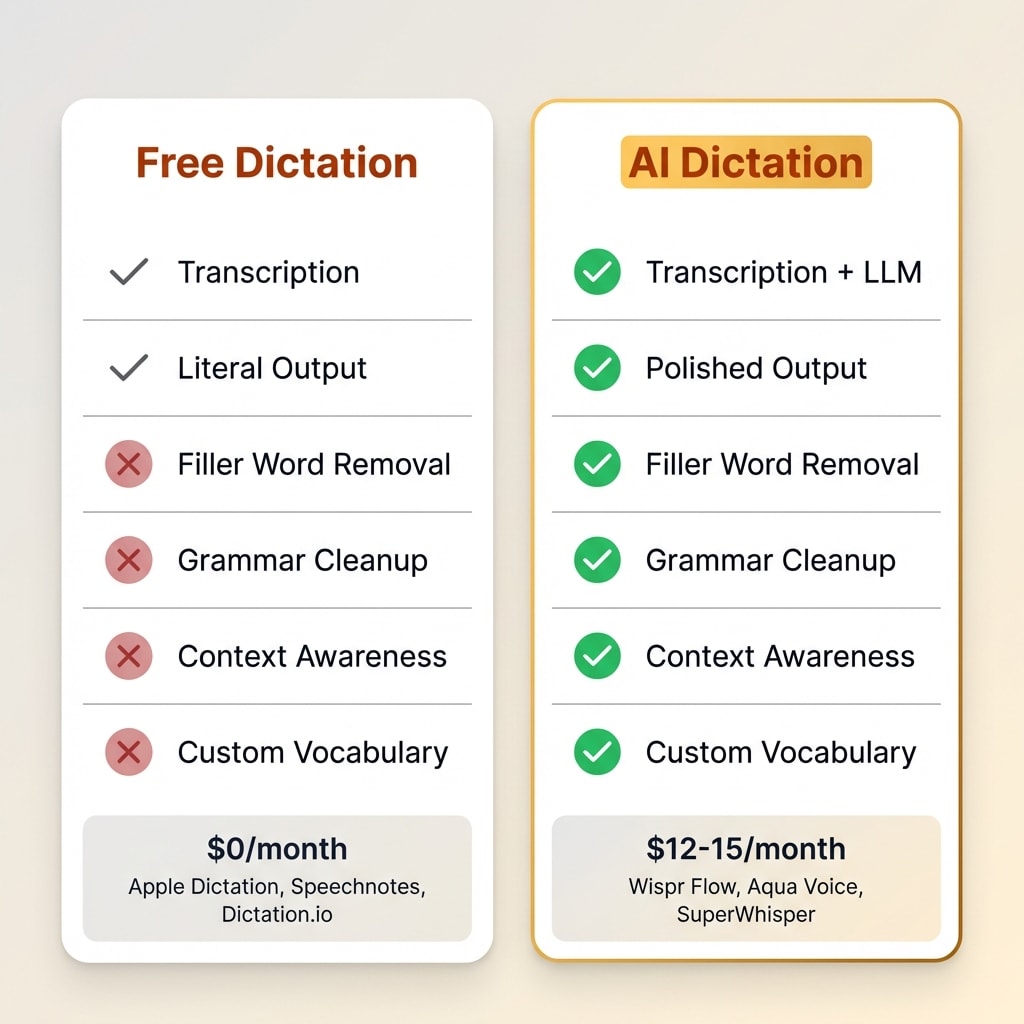
The gap between ai dictation free tools and paid products is entirely the intelligence layer. If you just need words on a screen, free works. If you want text you can send without editing, you need Layer 2.
Where AI Dictation Is Heading
The technology is moving fast. Here is where things are going based on what I see in the market.
Multimodal models are collapsing the layers. GPT-4o Transcribe already handles both transcription and language understanding in a single model, pushing word error rates to 2.46%. Expect other providers to follow. The two-layer architecture may simplify into one layer that does everything.
Voice as a primary interface. Wispr Flow raised $81 million at a $700 million valuation to build what they call the "Voice OS." The bet is that voice becomes the default way to interact with computers, not just a typing replacement. The demand is clearly there. Knowledge workers are increasingly interested in voice-driven workflows, and tools like Wispr Flow are betting that voice replaces the keyboard for most text input within the next few years.
Real-time streaming. Aqua Voice already shows text streaming as you speak rather than processing after you stop. Expect real-time output to become standard within a year or two.
On-device processing. Privacy-conscious users want local models. NVIDIA Parakeet and similar on-device solutions are closing the accuracy gap with cloud models. The tradeoff between privacy and quality is shrinking with each generation.
The commoditization prediction. Within two to three years, basic transcription plus cleanup will be a free built-in feature on every operating system. Apple's macOS on-device engine is already competitive with Whisper on speed. The products that survive will be the ones that built something meaningful on top of raw transcription. The Layer 2 and Layer 3 capabilities, not the transcription itself, will determine the winners.
Frequently Asked Questions
Something New Is Coming...
A weekly breakdown of what's working across SaaS, ecommerce, and online marketing. The kind of stuff I'd tell a friend. Not launched yet, but you can grab a spot. Totally free!
Is AI dictation more accurate than typing?
Modern AI dictation achieves word error rates below 4%, which is close to human transcription accuracy. For most people, dictation is both faster and comparably accurate to typing, especially for longer-form content like emails and documents.
What is the difference between AI dictation and regular voice typing?
Regular voice typing converts speech to text literally, including every filler word and false start. AI dictation adds an intelligence layer that cleans up grammar, removes filler words, handles self-corrections, and applies formatting automatically.
Is there free AI dictation software?
Yes. Tools like Speechnotes and Dictation.io offer free browser-based dictation. Whisper can be run locally at no cost. However, free tools typically lack the LLM post-processing layer that makes paid products produce polished output.
What is OpenAI Whisper and why does it matter for dictation?
Whisper is an open-source speech recognition model released by OpenAI in September 2022. Trained on 680,000 hours of audio, it achieves near-human accuracy. Its open-source release gave every developer free access to world-class transcription, directly causing the explosion of AI dictation apps.
Does AI dictation work offline?
Some tools support offline use through on-device models like NVIDIA Parakeet or local Whisper installations. However, most popular apps require an internet connection because they process audio through cloud-based models for higher accuracy and LLM cleanup.
The Bottom Line
AI dictation is a two-layer system. A speech recognition model like Whisper handles the transcription. A large language model handles the cleanup and formatting. Understanding this architecture makes it easy to evaluate any tool in the space.
If you just need basic transcription, free tools work fine. If you want your rambling turned into polished, send-ready text, you need the LLM layer. That is what you pay for with products like Wispr Flow.
The speaking speed advantage alone makes this worth exploring. You speak at 120-150 words per minute. You type at 35-45. That three to four times speed difference adds up to hours saved every week for anyone who writes seriously. A 1,000-word document takes roughly 25 minutes to type but eight to 10 minutes to dictate.
The technology is moving fast. Voice-first computing is no longer a science fiction concept. It is a two-layer architecture you can understand in 10 minutes and start using today.